
Top 10 Oncology Clinic Management Software for Cancer Specialists
Top 10 Oncology Clinic Management Software for Cancer Specialists in India 2026
Oncology clinics and cancer hospitals manage some of the most complex patient journeys in healthcare. From the first consultation and diagnostic investigations to surgery, chemotherapy, radiation therapy and long-term follow-ups, every stage requires accurate documentation and coordination between healthcare professionals.
Managing these activities through paper files, spreadsheets and disconnected applications can make it difficult to retrieve patient histories, organise appointments, maintain clinical records and coordinate administrative operations.
Oncology clinic management software helps cancer specialists digitise everyday practice activities. Depending on the platform, it may include electronic medical records (EMR), appointment scheduling, digital prescriptions, diagnostic report management, billing, pharmacy workflows, inpatient management and patient communication.
However, not every general clinic management system provides specialised oncology functionality. Cancer centres should carefully evaluate whether a solution supports their actual requirements, including chemotherapy protocols, treatment-cycle tracking, toxicity monitoring, radiation therapy workflows and multidisciplinary tumour board documentation.
In this guide, we explore 10 oncology and healthcare management software options that cancer specialists can evaluate in 2026, with a closer look at Doctors App, its features and published pricing.
What Is Oncology Clinic Management Software?
Oncology clinic management software is a digital platform that helps cancer specialists manage clinical records and the administrative activities of an oncology practice.
A general oncology EMR may support patient registration, consultation notes, prescriptions, investigation reports and follow-up scheduling. More specialised oncology information systems may also provide cancer staging, chemotherapy regimen management, radiation therapy planning, treatment-cycle tracking and adverse-event documentation.
The exact capabilities depend on the software and its configuration.
For an oncology clinic, the objective is to maintain organised patient information, reduce repetitive administrative work and make relevant clinical records accessible to authorised healthcare professionals.
Top 10 Oncology Clinic Management Software for Cancer Specialists
The following is an editorial shortlist of healthcare and oncology software platforms to evaluate. These products have different scopes: some focus on general EMR and hospital management, while others offer more specialised oncology workflows. This is not an independently audited ranking, and feature availability should be confirmed directly with each provider.
1. Doctors App – AI-Powered EMR and Clinic Management Software
Best for: Oncology clinics, individual cancer specialists and hospitals looking for an EMR and healthcare management platform.
Doctors App offers EMR, EHR and healthcare management capabilities for clinics and hospitals. Its published oncology offering describes an oncology-focused EMR experience alongside broader patient documentation and healthcare management workflows.
For cancer specialists, maintaining a patient's consultation history, prescriptions, investigation reports and follow-up information in an organised digital record can make everyday practice management easier.
Key features and capabilities:
-
Digital patient registration and medical records
-
Oncology-oriented patient documentation
-
Digital prescriptions in less than 20 seconds
-
Appointment scheduling and follow-up management
-
Investigation entry and diagnostic report uploads
-
OPD management and medical billing
-
IPD management and discharge documentation
-
Laboratory and pharmacy management options
-
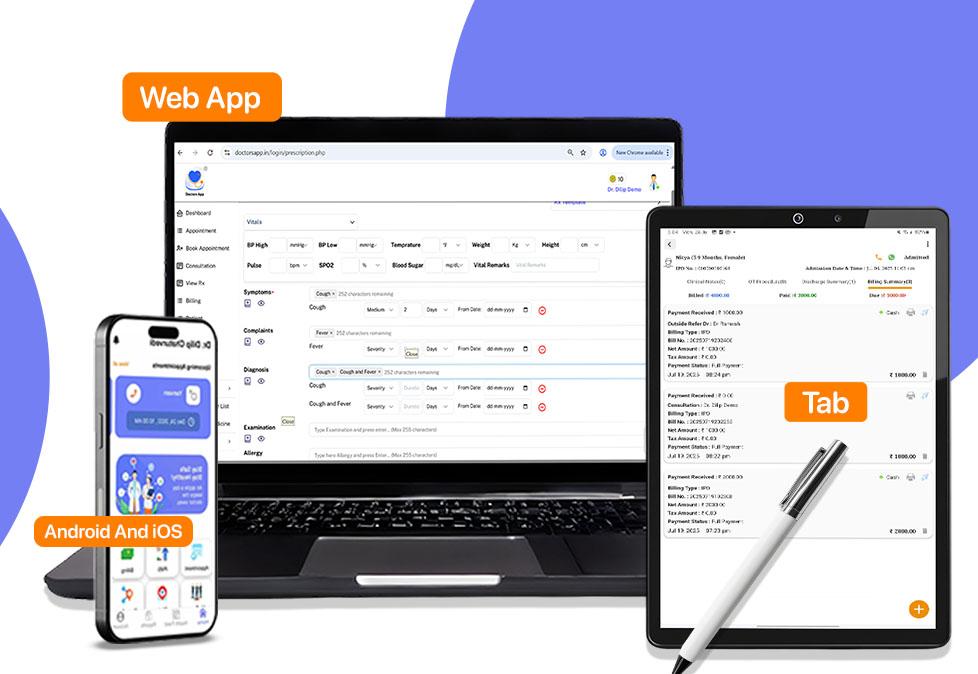
Cloud-based access through web and mobile applications
-
Staff roles and access restrictions
-
ABDM and ABHA-related capabilities
-
WhatsApp patient reminders and communication options
Doctors App also describes oncology-related documentation in its published oncology offering. Cancer centres should request a demonstration of the exact workflows they need, particularly structured cancer staging, chemotherapy regimen management, dose calculation, toxicity tracking and radiotherapy integration.
Why consider Doctors App?
Doctors App brings several everyday clinic and hospital operations together in one platform. Instead of maintaining separate records for appointments, consultations, prescriptions, billing and investigation reports, healthcare teams can evaluate a connected EMR and management workflow.
Its digital prescription feature supports prescription creation in less than 20 seconds. AI Voice to Rx is available as an add-on, rather than being assumed to be included in every subscription.
For oncology practices that also require inpatient workflows, Doctors App provides IPD patient registration, ward and bed allocation, clinical notes, nursing notes, eMAR, investigation history, discharge summaries and IPD billing capabilities.
Important: A general EMR or HMIS should not automatically be considered a complete chemotherapy or radiotherapy information system. Ask Doctors App to demonstrate any specialist oncology functionality before implementation.
2. Presco HOS Oncology Workstation
Best for: Cancer hospitals evaluating a dedicated oncology workstation.
Presco HOS Oncology Workstation is an oncology-focused software option listed for medical, surgical and radiation oncology workflows.
Cancer hospitals can evaluate its suitability for specialist documentation, treatment coordination and oncology department operations.
Capabilities to evaluate:
-
Medical oncology workflows
-
Surgical oncology documentation
-
Radiation oncology workflows
-
Oncology patient records
-
Treatment-related documentation
-
Integration with existing hospital systems
Before selecting the platform, hospitals should request demonstrations of chemotherapy ordering, dose verification, treatment-cycle management and radiation therapy requirements.
3. Siemens Healthineers ARIA Oncology Information System
Best for: Healthcare facilities evaluating specialised oncology information systems.
ARIA is an oncology information system from Siemens Healthineers. It is designed for oncology-related clinical workflows, including medical and radiation oncology.
Cancer centres considering this type of platform should evaluate how it fits into their existing oncology technology environment.
Capabilities to evaluate:
-
Oncology information management
-
Medical oncology workflows
-
Radiation oncology workflows
-
Treatment-related documentation
-
Clinical information coordination
-
Integration with relevant oncology systems
Hospitals should confirm the required modules, licensing, implementation requirements and compatibility with their existing equipment and information systems.
4. DigitalOnco Harmony
Best for: Cancer centres looking for oncology-specific workflow management.
DigitalOnco Harmony is positioned as an oncology information system supporting different cancer-care disciplines. Its published capabilities include chemotherapy and radiation therapy workflows, tumour board management and cancer-specific templates.
Capabilities to evaluate:
-
Cancer-specific documentation templates
-
TNM staging support
-
Chemotherapy regimen management
-
Radiation therapy workflows
-
Tumour board scheduling
-
Oncology patient-care pathways
-
OT and counselling-related modules
Cancer centres should confirm the available integrations, implementation scope and specialist workflow coverage.
5. DMediQ Oncology Software
Best for: Oncology clinics evaluating specialty-oriented consultation and treatment workflows.
DMediQ describes an oncology-focused EMR with documentation for cancer diagnosis, staging, histopathology and treatment-related information.
Capabilities to evaluate:
-
Oncology consultation documentation
-
TNM staging and histopathology records
-
Regimen and treatment-cycle details
-
Body surface area-based dose calculations
-
Chemotherapy day-care scheduling
-
Pharmacy and laboratory workflow connections
-
Cycle reminders and billing workflows
Oncology specialists should check how the system handles clinical approvals, dose changes, adverse-event documentation and treatment administration records.
6. DR.CORD Oncology Software
Best for: Oncology and haematology clinics seeking connected practice workflows.
DR.CORD describes specialty-oriented workflows for oncology and haematology practices. Its published information highlights patient records, consultation workflows, chemotherapy-cycle information, toxicity-related documentation and infusion scheduling.
Capabilities to evaluate:
-
Longitudinal patient records
-
Oncology consultation documentation
-
Cancer staging information
-
Chemotherapy-cycle tracking
-
Toxicity documentation
-
Infusion scheduling
-
Prescriptions and follow-up communication
-
Billing and operational reporting
Clinics should verify which specialist features are available in their selected plan.
7. Drlogy Oncologist Software
Best for: Oncology clinics looking for patient and practice management tools.
Drlogy offers software for oncologists and cancer-related clinical practices. Its published product information describes patient registration, appointment management, queue management, billing and clinical documentation.
Capabilities to evaluate:
-
Oncology patient registration
-
Appointment scheduling
-
Patient queue management
-
OPD and IPD workflows
-
Digital medical records
-
Billing and payment management
-
Laboratory report management
-
Follow-up documentation
Before implementation, ask whether the software supports the specific cancer-care documentation and treatment coordination processes used by your clinic.
8. OncoCare
Best for: Oncology practices evaluating dedicated cancer-care EMR capabilities.
OncoCare describes a specialist oncology platform for clinicians and cancer-care teams. Its published offering includes oncology-focused patient management and clinical documentation capabilities.
Capabilities to evaluate:
-
Oncology patient records
-
Chemotherapy protocol templates
-
Treatment-cycle information
-
Toxicity tracking
-
Body surface area and dose-calculation tools
-
Tumour board collaboration
-
ABDM-related capabilities
-
Patient follow-up and care coordination
Cancer specialists should verify the supported protocols, clinical safety checks, integrations and subscription terms before choosing a plan.
9. Gemini Onco HIMS
Best for: Cancer hospitals evaluating a dedicated oncology hospital information system.
Gemini Onco HIMS describes a cancer-care management platform covering different oncology departments and hospital workflows.
Capabilities to evaluate:
-
Medical oncology
-
Surgical oncology
-
Radiation oncology
-
Oncology patient registration
-
Chemotherapy management
-
Pathology and laboratory workflows
-
Tumour board documentation
-
Cancer registry-related workflows
-
Hospital reporting and operational management
Hospitals should assess how the platform connects clinical, administrative and diagnostic workflows and whether it supports their existing infrastructure.
10. GoClinicBox Oncology Software
Best for: Oncology clinics evaluating appointment, consultation and administrative management.
GoClinicBox describes an oncology-oriented clinic management offering that connects appointments, OPD notes, prescriptions, pharmacy and billing workflows.
Capabilities to evaluate:
-
Patient appointment management
-
Front-desk and queue workflows
-
Oncology consultation documentation
-
Investigation records
-
Digital prescriptions
-
Pharmacy-related workflows
-
GST billing
-
Patient follow-up management
Clinics should confirm the depth of its oncology-specific functionality and whether it is suitable for their treatment and documentation requirements.
Essential Features of Oncology Clinic Management Software
Choosing oncology clinic management software requires more than checking whether a platform provides appointment booking or digital prescriptions. Cancer specialists should assess the complete clinical and administrative workflow.
1. Oncology Patient Management
Cancer patients may require repeated consultations, investigations, treatment reviews and long-term follow-ups. A digital patient management system should help authorised staff access relevant patient information without searching through multiple paper files.
Look for:
-
Digital patient registration
-
Patient demographic information
-
Medical history
-
Consultation records
-
Previous prescriptions
-
Investigation reports
-
Follow-up history
2. Electronic Medical Records
An oncology EMR should provide organised documentation of consultations and relevant clinical information.
A useful system should allow doctors to record clinical notes, diagnoses, prescriptions, investigations and patient progress.
For specialised oncology practices, confirm whether structured fields for cancer type, histopathology, staging and treatment intent are supported.
3. Chemotherapy Documentation
Chemotherapy involves detailed protocols, medicines, dosage calculations, treatment cycles and administration records.
A specialised chemotherapy management system may include:
-
Chemotherapy regimen libraries
-
Treatment-cycle scheduling
-
Weight- or body surface area-based dose calculations
-
Dose modification records
-
Pre-medication documentation
-
Pharmacy verification
-
Nursing administration records
-
Adverse-event documentation
These are specialist requirements. Do not assume that a general EMR includes them. Ask the vendor to demonstrate the complete workflow before purchasing.
4. Diagnostic and Laboratory Report Management
Cancer treatment decisions may involve pathology, biopsy, blood investigations and diagnostic imaging reports.
Software should make it convenient to attach, organise and retrieve relevant investigation records.
Depending on the system, diagnostic imaging management may also support the organisation of X-ray, CT scan, MRI and ultrasound reports. Confirm whether actual image viewing, PACS connectivity or DICOM integration is included.
5. Appointment and Follow-Up Management
Oncology clinics often manage recurring consultations and treatment reviews.
Appointment management software can help teams:
-
Schedule new consultations
-
Manage follow-up appointments
-
Organise doctor availability
-
Track patient visits
-
Send appointment reminders
-
Reduce manual scheduling work
WhatsApp reminders can also help patients remember their scheduled follow-up visits.
6. Radiation Oncology Workflow Support
Radiation oncology involves treatment planning, scheduling, dose documentation and coordination with specialised equipment.
A hospital evaluating oncology software should check whether it supports radiation treatment records or integrates with a dedicated radiation oncology information system.
Do not assume that general diagnostic imaging management includes radiotherapy planning or machine integration.
7. IPD and Hospital Management
Cancer hospitals may need software that connects outpatient consultations with inpatient admissions, ward management, nursing documentation, billing and discharge processes.
Important capabilities include:
-
IPD patient registration
-
Ward and bed allocation
-
Doctor clinical notes
-
Vitals monitoring
-
Nursing notes
-
Medication administration records
-
Investigation history
-
Discharge summaries
-
IPD billing
8. Pharmacy and Medication Management
Cancer hospitals may manage multiple medicines, prescriptions, pharmacy transactions and inventory requirements.
A suitable pharmacy management workflow can help organise medicine dispensing, inventory, purchases and billing.
For chemotherapy medicines, hospitals should separately verify whether the system provides specialist verification, preparation and administration controls.
9. Billing and Insurance Management
Oncology treatment may involve consultations, investigations, procedures, admissions and insurance-related documentation.
Healthcare management software should help organise billing records and payment information.
Hospitals handling government health schemes or insurance should check the availability of relevant workflows, including NHCX and PM-JAY requirements, and confirm the actual scope of integration.
10. Data Security and Access Control
Oncology records contain sensitive patient information. A software platform should provide appropriate access controls and safeguards.
Evaluate:
-
Role-based user access
-
Secure login
-
Data backup policies
-
Change logs or audit history
-
Patient record confidentiality
-
Data migration arrangements
-
Data export and retention policies
Doctors App Pricing for Clinics and Hospitals
Doctors App provides published annual pricing for its clinic OPD/EMR plans. Hospital IPD/EMR pricing is available on request.
The clinic plans can be evaluated by individual oncologists and smaller practices that need general EMR and clinic management capabilities. They should not be treated as oncology-specific chemotherapy or radiotherapy packages.
Doctors App Clinic Pricing
| Feature | Professional | Premium |
|---|---|---|
| Annual price | ₹10,999 | ₹16,999 |
| Price including 18% GST | ₹12,979 approx. | ₹20,059 approx. |
| Doctor access | 1 | 1 |
| Staff access | 2 | 3 |
| Appointment scheduling | Included | Included |
| Digital prescriptions | Included | Included |
| Investigation entry and report uploads | Included | Included |
| Web, Android and iOS access | Included | Included |
| Clinic analytics | Included | Included |
| Cloud storage and backup | Included | Included |
| WhatsApp credits | Limited | Included as per plan |
| Support | Standard | Priority |
| Promotion and campaign tools | Not included | Included |
Prices are exclusive of 18% GST unless stated otherwise. Confirm the latest commercial terms, WhatsApp credit allowance and device availability with Doctors App.
Optional Features and Add-ons
Some features are available as add-ons rather than standard inclusions in the annual clinic plans.
-
AI Voice to Rx
-
AI investigation extraction
-
Stylus-based handwritten prescriptions
-
Laboratory management
-
Pharmacy management
Doctors App Hospital Pricing
Doctors App offers Professional and Premium IPD/EMR plans for hospitals. The pricing is provided through a quotation.
Hospitals can contact the team to discuss requirements such as:
-
IPD patient registration
-
Ward and bed allocation
-
Doctor and nursing notes
-
Vitals monitoring
-
eMAR medication administration records
-
Investigation and laboratory history
-
OT procedure documentation
-
Discharge summaries
-
IPD billing
-
Insurance and TPA details
-
Role-based access and change logs
Stylus functionality, AI discharge summary generation, ABDM/ABHA care-context linking and selected integrations are subject to add-on availability and plan terms.
For current pricing and a personalised demonstration:
Website: https://www.doctorsapp.in/
WhatsApp: +91 85917 52176
Email: [email protected]
Comparison Table: Top 10 Oncology Clinic Management Software for Cancer Specialists
|
Software |
Best For |
Key Features / Capabilities |
Pricing |
|---|---|---|---|
|
1. Doctors App |
Oncology clinics and multi-specialty hospitals |
Digital patient records, EMR, OPD/IPD management, e-prescriptions, appointments, billing, lab and pharmacy management, AI-assisted clinical documentation |
Starts at ₹10,999/year + 18% GST for clinic OPD plan |
|
2. HealthPlix |
Oncologists and individual specialists |
Digital prescriptions, electronic medical records, clinical documentation and consultation workflows |
Contact vendor |
|
3. Practo Ray |
Private oncology clinics |
Patient records, appointment scheduling, billing, reminders, prescriptions and clinic management |
Published plans start at ₹999/month; confirm current terms |
|
4. Eka Care |
Digital patient records and connected healthcare |
Digital health records, prescriptions, patient profiles, appointment management and ABDM-related workflows |
Starts at ₹16,999/year + GST for selected doctor plan |
|
5. MocDoc |
Oncology hospitals and multi-specialty facilities |
Hospital management, EMR, OPD/IPD, pharmacy, laboratory and administrative workflows |
Contact vendor |
|
6. Clinicia |
Specialty clinics and growing practices |
Patient management, appointment scheduling, digital records, billing and clinical documentation |
Published plans vary; confirm current pricing |
|
7. DocPulse |
Clinics and hospitals |
EMR/EHR, appointment management, billing, pharmacy, laboratory and patient communication |
Custom quote |
|
8. Halemind |
Small and mid-sized healthcare facilities |
Clinic and hospital management, patient records, appointments, billing and clinical workflows |
Contact vendor |
|
9. MediXcel |
Hospitals and healthcare networks |
EMR, OPD management, patient records and healthcare information management |
Contact vendor |
|
10. OpenEMR |
Clinics seeking open-source solutions |
Electronic health records, appointment scheduling, patient management, prescriptions and billing |
Free open-source version; hosting and support may cost extra |
Important: This is a general software comparison, not a verified ranking of oncology-specific systems. Features and prices should be confirmed with vendors before purchase.
Why Choose Doctors App for Oncology Clinic Management?
Doctors App is designed to support clinics and hospitals with connected EMR and healthcare management workflows. For oncology specialists, its general clinical and administrative capabilities can help organise daily practice operations.
1. Digital Patient Records
Maintain patient information and consultation documentation in a digital format. Doctors can organise records, prescriptions and uploaded investigation reports for easier retrieval.
2. Faster Digital Prescriptions
Doctors App supports digital prescription creation in less than 20 seconds. Speciality-based prescription customisation can help doctors organise their prescription workflow.
AI Voice to Rx is an optional add-on and AI-generated content should always be reviewed by the treating doctor.
3. OPD and Appointment Management
Manage patient registration, appointments, consultations, billing and follow-ups through connected OPD workflows.
4. Diagnostic Report Management
Add investigations and upload laboratory and diagnostic reports to patient records. This can help maintain documentation in one place.
Confirm any required laboratory, PACS or diagnostic equipment integration separately.
5. IPD Management for Hospitals
Hospitals can manage inpatient registration, ward and bed allocation, clinical notes, nursing notes, investigations, eMAR and discharge summaries.
6. ABDM and ABHA Capabilities
Doctors App describes ABDM and ABHA-related capabilities, including ABHA ID creation and linking. Hospitals planning ABDM implementation should discuss the relevant M1, M2 and M3 milestones, required integrations and verification workflows with the product team.
The availability of specific ABDM functions depends on the selected product configuration and subscription.
7. Access Across Devices
Doctors App supports web, Android and iOS access, helping healthcare professionals use supported workflows across devices.
8. Patient Communication
WhatsApp reminders for follow-up appointments can help clinics maintain communication with patients and organise recurring visits.
9. Support for Clinic and Hospital Operations
Doctors App provides clinic and hospital management capabilities, helping healthcare teams evaluate a connected approach to appointments, records, billing and inpatient workflows.
10. Implementation and Onboarding Assistance
Doctors App describes implementation support, initial setup, onboarding guidance and ongoing assistance to help healthcare organisations adopt the platform.
How to Choose the Right Oncology Clinic Management Software
Before purchasing oncology software, cancer specialists should evaluate their current practice requirements.
For an individual oncologist: Prioritise patient records, digital prescriptions, consultation notes, appointments, investigation uploads and follow-up management.
For a multi-doctor oncology clinic: Evaluate multi-doctor access, staff permissions, patient records, billing, appointment coordination and reporting.
For a chemotherapy daycare centre: Look for chemotherapy protocols, dose calculations, infusion scheduling, pharmacy verification, nursing administration records and adverse-event documentation.
For a cancer hospital: Evaluate OPD, IPD, pharmacy, laboratory, billing, discharge management, oncology-specific workflows and integration requirements.
For a radiation oncology department: Confirm treatment planning, dose tracking, machine connectivity and integration with the existing oncology information system.
Questions to Ask Before Buying
-
Does the software provide structured oncology patient records?
-
Can doctors document cancer staging and histopathology?
-
Does it support chemotherapy protocols and treatment cycles?
-
Are dose calculations and verification workflows available?
-
Can the system record treatment-related adverse events?
-
Does it support radiation oncology workflows?
-
Can pathology and diagnostic reports be attached to patient records?
-
Does it support pharmacy and laboratory workflows?
-
Are user roles and audit trails available?
-
What are the implementation, migration and integration costs?
Ask the vendor to demonstrate a complete patient journey using a sample record. This is more useful than relying only on a feature list.
Frequently Asked Questions
1. What is the best oncology clinic management software in India?
The best software depends on the clinic's requirements. Doctors App is an option for oncology clinics evaluating EMR, digital prescriptions, OPD management, patient records, diagnostic report uploads and hospital management workflows. Cancer centres requiring chemotherapy dose calculations or radiotherapy planning should verify those specialist capabilities separately.
2. What features should oncology clinic management software include?
Important features include digital patient records, appointment scheduling, consultation documentation, prescriptions, investigation reports, billing and follow-up management. Specialised cancer centres may also require chemotherapy protocols, treatment-cycle tracking, toxicity monitoring, radiation oncology and tumour board workflows.
3. Is EMR software useful for oncologists?
Yes. EMR software can help oncologists maintain digital patient histories, consultation notes, prescriptions, investigation records and follow-up information. It can reduce dependence on paper files and make documentation easier to organise.
4. Does Doctors App support oncology clinics?
Doctors App publishes an oncology-focused offering along with general EMR and healthcare management capabilities. Its broader features include patient records, digital prescriptions, appointment scheduling, investigation uploads, OPD management and IPD workflows. Contact the team to confirm the exact oncology-specific functions available for your requirements.
5. How much does Doctors App cost?
Doctors App's published clinic OPD/EMR pricing starts at ₹10,999 per year for the Professional plan and ₹16,999 per year for the Premium plan, excluding 18% GST. Hospital IPD/EMR pricing is available on request. Optional features and integrations may have additional charges.
6. Does oncology software support chemotherapy management?
Some specialised oncology systems support chemotherapy protocols, treatment-cycle scheduling, dose calculations, medication verification and administration documentation. These capabilities are not standard in every general EMR. Ask the vendor to demonstrate the required workflow.
7. Can oncology software manage diagnostic reports?
Many EMR platforms allow doctors to upload and organise diagnostic reports. More advanced systems may provide laboratory or imaging integrations. Confirm whether the system supports report uploads, image viewing, PACS or DICOM connectivity as required.
8. Is cloud-based oncology software useful for small clinics?
Cloud-based software can help clinics access supported patient and practice records through web and mobile applications. Before selecting a platform, review its security controls, backup policy, access permissions and data ownership terms.
9. Can oncology clinics use general hospital management software?
Yes, general hospital management software can support administrative and clinical workflows such as OPD, IPD, appointments, billing and patient records. However, specialist oncology requirements may need additional modules or a dedicated oncology information system.
10. How can I book a Doctors App demo?
You can visit Doctors App or contact the team on WhatsApp at +91 85917 52176 to discuss your clinic or hospital requirements and request a personalised demonstration.
Conclusion
Selecting the right oncology clinic management software can help cancer specialists organise patient records, consultations, prescriptions, appointments, diagnostic reports and hospital operations.
However, oncology practices should not select software based only on general EMR features. Chemotherapy protocols, dose verification, toxicity tracking, radiotherapy planning and multidisciplinary care coordination require careful evaluation.
Doctors App offers EMR, OPD, IPD, digital prescription, patient record and healthcare management capabilities that oncology clinics and hospitals can explore. Its published clinic plans start at ₹10,999 per year, excluding GST, while hospital pricing is available on request.
Looking to digitise your oncology practice? Explore Doctors App and request a free personalised EMR demo to understand how its available features can support your clinic or hospital workflows.